How to Get Full Version of Tansee Products?
Why Get Full Version?
You can evaluate before purchasing.
Tansee provides free demo versions for all of our products to help users get a clear idea before making a purchase.
Please click here to download Tansee Apps and start the evaluation. After you purchase successfully, we will provide registration code to remove the limitations of the trial version.
Tansee provides free demo versions for all of our products to help users get a clear idea before making a purchase.
Please click here to download Tansee Apps and start the evaluation. After you purchase successfully, we will provide registration code to remove the limitations of the trial version.
How to Get Full Version?
Please click here to buy Tansee Apps. The license code will be delivered instantly by email. The subscription will NOT be automatically renewed.
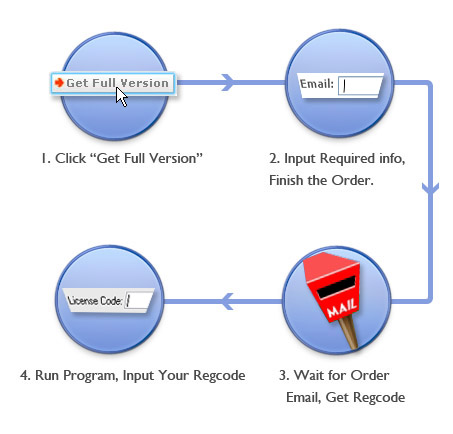
Get full version of Tansee product
Is it secure to purchase from Tansee Website?
No matter when you are browsing our website, downloading our products, or making an online purchase, your privacy is guaranteed by us.
We cooperate with 2Checkout to receive payments. During the ordering process, all the data and information you provide will be kept confidential.
We cooperate with 2Checkout to receive payments. During the ordering process, all the data and information you provide will be kept confidential.
What kinds of payment can I use?
There are several payment options for you to choose from, such as Visa/MasterCard/Euro card, Alipay, American Express, JCB, Discover/Novus, Bank/Wire transfer, Diners Club, Fax and ....
Is the order processed successfully or not?
After your payment is completed, all detailed product information, including the Order ID, Email Address, and Registration code, will be sent by the payment platform shortly.
Please check both your inbox and spam folder to see if the auto-generated email has been marked as spam. If you have successfully placed an order but have not received the registration email, you can contact us for further assistance.
Tips: To receive prompt and specific support, please provide the Order Number and the Email Address you used during the purchase, or attach the confirmation email from the payment platform in your initial email. This will help us locate your order more efficiently.
Please check both your inbox and spam folder to see if the auto-generated email has been marked as spam. If you have successfully placed an order but have not received the registration email, you can contact us for further assistance.
Tips: To receive prompt and specific support, please provide the Order Number and the Email Address you used during the purchase, or attach the confirmation email from the payment platform in your initial email. This will help us locate your order more efficiently.